
Explorer Trending on Etherscan, BscScan, BaseScan and Solscan

Traders open a block explorer when they want to check a contract, not a chart. Etherscan, BscScan, BaseScan and Solscan all surface a short list of tokens inside the search experience itself — the panel that drops down the moment a user clicks the search bar, before typing anything.
That search-panel list is what explorer trending means in this guide. It is not the explorer’s statistical token tables, and it is not explorer ad inventory. Below: what the surface actually contains, what we can and cannot say about how it ranks, the exact terms of PandaBoost’s four explorer Trending services, and how to choose between them.
What the Explorer Trending List Actually Is
Etherscan, BscScan and BaseScan include Trending Tokens within the expanded search panel. This makes the search bar a discovery surface as well as a tool for looking up a known address. Token teams should distinguish these token rows from Trending Addresses and any separately labelled sponsored placements.
Solscan’s official homepage guide describes Trending Search as showing the most searched tokens. Solscan uses its own interface; it should not be assumed to share the EVM explorers’ ranking process.
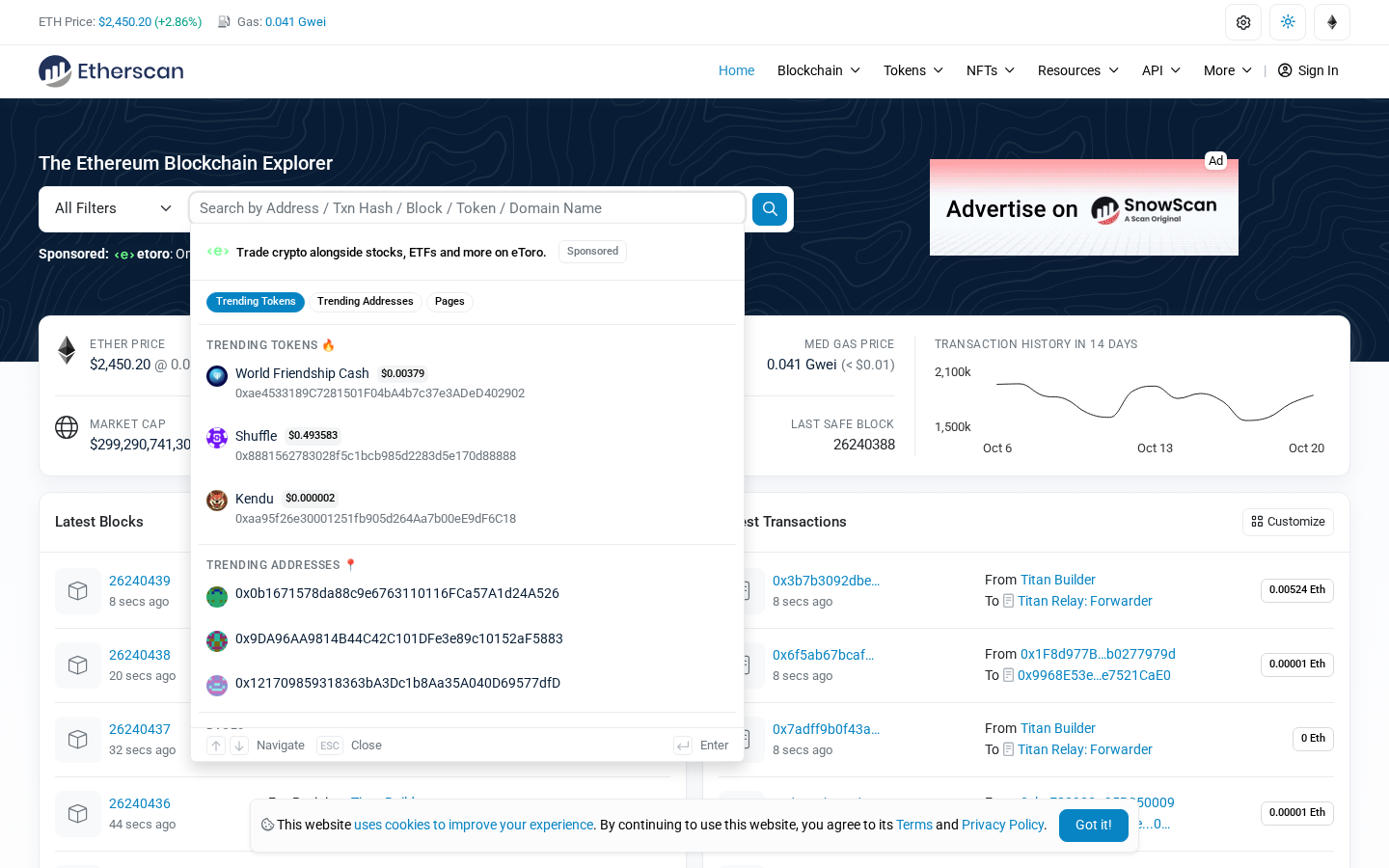
Three surfaces exist on these explorers and briefs routinely confuse them:
- The search-panel trending list — the short ordered list described above. This is what the services below address.
- Statistical token tables — separate explorer pages ranking tokens by holders, transfers or market cap. These answer a different question from search-panel discovery.
- Explorer ad inventory — clearly labelled paid placements with advertiser markup and external-link tooltips. A labelled ad unit is a different element from a trending row.
What Trending Visibility Does for a Token Campaign
Explorer promotion puts a token in front of users checking contracts, transfers and on-chain activity. It complements discovery through charts and aggregator lists rather than replacing those channels.
A trending appearance is not a security review, contract verification or endorsement by the explorer. Likewise, a paid campaign’s position range is a PandaBoost service term, not an explanation of the explorer’s ranking algorithm.
Solscan describes its surface in terms of searches. We have not verified a public formula for the EVM explorers’ Trending Tokens lists. Visible counters or a single screenshot do not establish a ranking window, weighting or universal refresh schedule.
For a launch campaign, align the appearance window with the moment your token page and wider announcement are ready. Visibility alone does not establish demand, liquidity or price performance.
Traders who discover the token through a search panel still need clear information about the project waiting for them when they arrive.
PandaBoost Explorer Trending: Terms and Prices
Four separate services, one per explorer, each covering the explorer named in its title. The packages below describe PandaBoost services, not official explorer advertising packages. Each service costs $350 for 24 hours. The token must exist on the selected chain; no additional requirements.
| Service | Ordered rank range | Time to appear | Price |
|---|---|---|---|
| Etherscan Trending | TOP 1–3 | 4–8 hours | $350 / 24h |
| BSC Scan Trending | TOP 1–3 | 4–8 hours | $350 / 24h |
| Base Scan Trending | TOP 1–3 | 4–8 hours | $350 / 24h |
| SolScan Trending | TOP 1–10 | 2–6 hours | $350 / 24h |
Four details get misread constantly.
Each service is ordered separately. The identical $350 price is per service, per 24-hour campaign. Four explorers means four orders at $350 each. The $350 price does not cover all four explorers together.
Rank bands differ. The three EVM explorers are ordered as TOP 1–3. Solscan is ordered as TOP 1–10. Same price, different band width; that is the key asymmetry when planning a multi-chain push.
Appearance windows differ. Solscan placements appear 2–6 hours after order, the EVM explorers 4–8 hours. Build that lead time into the launch schedule instead of ordering at the moment you want visibility.
Eligibility is minimal. The token needs to exist on-chain. No listing prerequisite, no volume floor, no holder count, no liquidity threshold, no verification gate. CoinGecko and CoinMarketCap criteria do not transfer here — different platforms, different rules.
The deliverable is a 24-hour placement at the ordered rank range on the specified explorer. It is not a permanent position, not an indefinite #1, and not a market outcome. Placement is distribution; what traders do next depends on your token, not the slot. Placement also does not propagate — an Etherscan campaign does nothing on BscScan, BaseScan or Solscan, and token metadata (logo, name, socials) likewise lives separately on each explorer with its own submission process.
Choosing Explorers and Placing the Order
Match the explorer to where your contract actually lives, then to where lookups actually happen.
- Single-chain token. Run the one explorer matching your deployment. For example, choose Etherscan for an Ethereum token and BaseScan for a Base token.
- Multi-chain deployment. Order per chain where you have real contract activity, and weigh the band difference: TOP 1–3 on an EVM explorer is a tighter band than TOP 1–10 on Solscan.
- Solana-native token. SolScan Trending is the match — TOP 1–10, 2–6 hour window.
- Sequencing. Explorer trending catches contract-lookup intent. Chart and aggregator surfaces catch browsing intent. These are complementary moments in a launch plan, not substitutes.
Before ordering, have the correct contract address on the correct chain, a token page whose basic information is already populated (the slot sends traffic to whatever is there now), and a schedule accounting for the appearance window.
To order, open the PandaBoost Web Panel or @pandaboostbot, select the appropriate explorer Trending service, and follow its order form. Check the current service card before checkout.
Related guides: token launch marketing services, CoinGecko Search and Country Trending and CoinMarketCap Trending and Most Visited — explorer search visibility is a separate placement from each of those.
Order Explorer Trending
Promote your token where traders check contracts. Choose Etherscan, BscScan, BaseScan or Solscan — $350 per explorer for a 24-hour campaign.
FAQ
A short ordered list of tokens inside the expanded search panel on Etherscan, BscScan, BaseScan or Solscan, shown when a user clicks the search bar before typing. It is distinct from the explorers' statistical token tables and from their labelled ad slots.
$350 per 24-hour campaign for each service — Etherscan Trending, BSC Scan Trending, Base Scan Trending and SolScan Trending. The price applies separately to each explorer.
The ordered rank range the service card states: TOP 1–3 on Etherscan, BscScan and BaseScan; TOP 1–10 on Solscan. Solscan placements appear 2–6 hours after order, the three EVM explorers 4–8 hours. Every placement runs 24 hours.
No. The only requirement is that the token exists on-chain. There is no volume, liquidity, holder-count or listing prerequisite, and CoinGecko or CoinMarketCap listing criteria do not apply.
Solscan's documentation describes Trending Search as the most searched tokens. A complete ranking formula for the four services has not been verified; campaign terms should not be confused with the explorers' ranking criteria.
No. The deliverable is a 24-hour placement at the ordered rank range — distribution, not a market outcome. We make no claims about buyers, volume, price or chart behaviour. Placement is also explorer-specific and does not propagate to other explorers.
Related readings

Whatever stage you're at — we're the stack.
Pre-launch? Bundle safe, warm wallets, fund quiet.
Post-launch? Trend on every scanner, chart and feed that matters.
The launch window is short. Don't waste it.