
Solana Volume Bot: How It Works, Costs and Controls

A Solana volume bot automates repeated trading actions across wallets you configure. Panda Bundler puts wallet activity, token launch preparation and trading controls in one browser workspace, so you can set the wallet scope, amounts and timing without placing every action manually.
Choose the workflow that matches your task: Activity in Wallet Manager for wallet activity, or Auto buy / Auto sell in a token’s terminal for that token’s trading rules. Activity from wallets you manage is not the same as demand from independent buyers.
Choose Your Workflow
Start with the wallets and the action you need to repeat. A wallet-activity run and a token-specific trading strategy have separate settings; configuring one does not configure the other.
| Task | Where to configure it |
|---|---|
| Repeated wallet activity | Wallet Manager → select wallets → Activity |
| Token purchases | The token’s terminal → Auto buy |
| Token sales | The token’s terminal → Auto sell |
| Individual orders | Terminal → Market, Limit or Grid |
For token creation, holder allocation and Block-0, follow the Solana Bundler Guide. The controls below cover recurring activity and trading after choosing the appropriate workspace.
Activity Settings
In Wallet Manager, select the intended wallets and open Activity. The Generate activity panel keeps the run settings and funding check together.
- SOL per trade: the configured amount for each trade.
- Loops: buy → sell cycles per wallet.
- Delay: the interval between loops.
- Bundle buy & sell: the option for buying and selling in the same block.
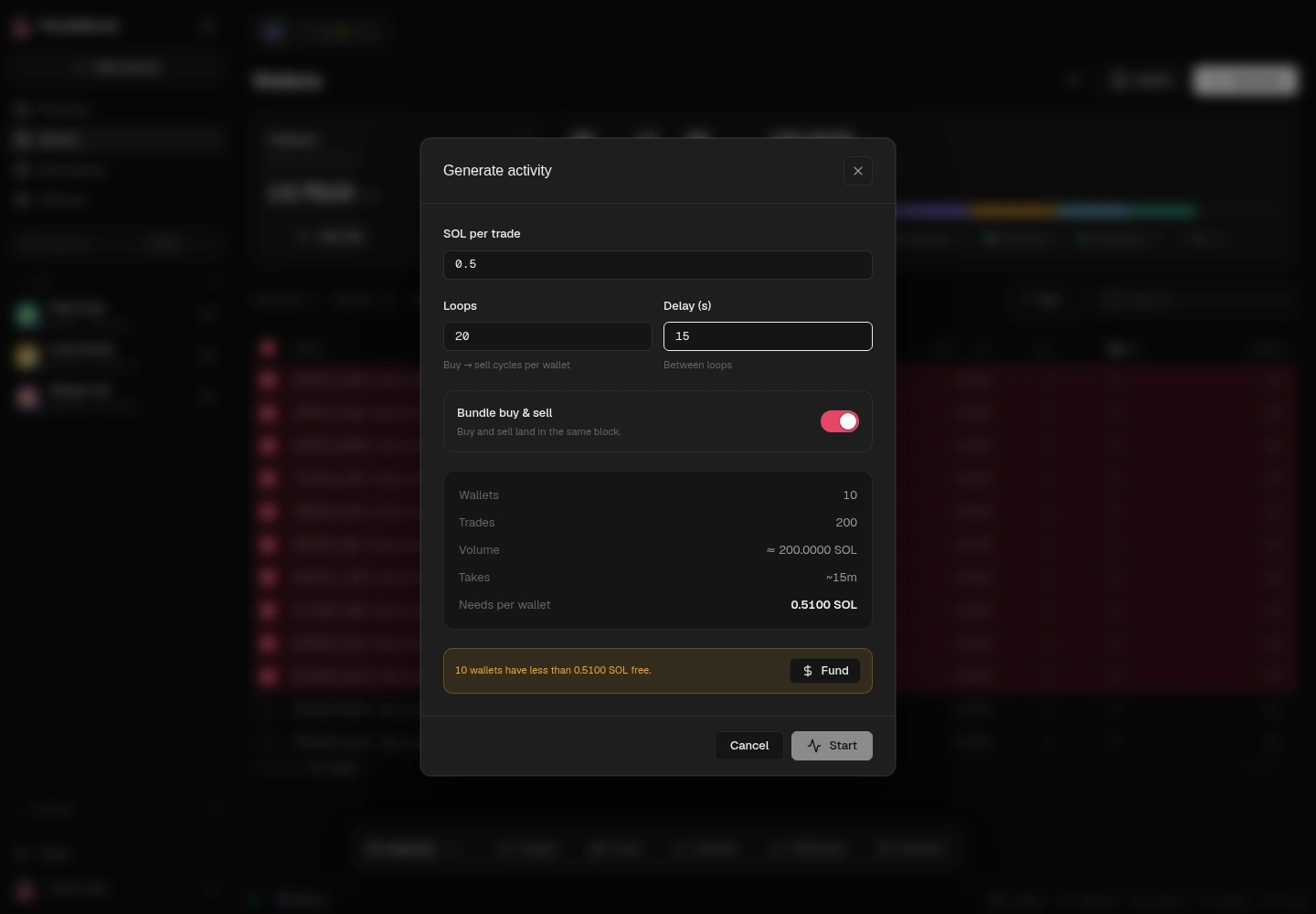
Review Wallets, Volume, Takes and Needs per wallet together. If the panel reports insufficient balances, resolve the funding requirement before starting. Changing the wallet count, amount or loops means reviewing that summary again.
Keep wallet funding separate from costs: a balance enables the configured actions, while fees and execution effects consume funds. Turnover can include funds used in successive trades; it is not a fee quote or a profit figure.
Auto Buy and Sell
For a specific launch token, open its terminal. Auto buy and Auto sell each expose Counter-trade, DCA and Market cap modes. Choose the mode first, then configure the fields it exposes.
- Auto buy DCA: set the amount and delay, choose fixed or randomized sizing, then review wallet scope, slippage and end conditions.
- Auto sell DCA: choose the sale unit, such as percentage of supply, percentage owned or token amount, and review timing and included wallets.
- Limits: check both the individual strategy and the overall end conditions. A per-action amount is not automatically a cap for the complete workflow.
Keep the chart, wallet positions and task status in view while managing a run. Before retrying a failed action, inspect its status and any transaction signature. Stopping future actions does not necessarily cancel a transaction already submitted.
Manual and conditional orders remain available in the same terminal. Use Market, Limit or Grid when a discrete order is a better fit than a recurring strategy.
Costs and Getting Started
Panda Bundler has no subscription and no platform buy fee. The standard platform fee is 5% on sells. Network, priority, protocol and other third-party costs are separate; check the terms of the selected workflow before starting.
New users can request 0% Panda Bundler fees for their first launch through support before starting. External costs remain. Confirm the scope of the offer rather than assuming it covers every separate wallet-activity run.
- Choose wallet activity or the relevant token’s trading terminal.
- Review the selected wallets and their balances.
- Set amounts, timing and end conditions.
- Review the funding requirement and applicable costs.
- Monitor completed actions before repeating the workflow.
Keep private keys and recovery phrases out of support chats. Before funding, copy the destination from the current workspace.
Manage wallets, launch and trade from one workspace. Open Panda Bundler or ask support about your setup.
Launch and Trade in One Workspace
First launch: 0% Panda Bundler fees on request. Network and protocol costs remain.
FAQ
It automates configured trading actions across selected wallets. Depending on the implementation, it can repeat buys or buy-and-sell actions with defined amounts and timing. This creates activity from managed wallets, not proof of independent demand.
Yes. Activity Generation is one feature within Panda Bundler’s launch and trading workspace. Its documentation describes wallet scope, trade amount, loop count, delay, funding options and sell-after-buy behavior.
No. Turnover measures executed trading activity. Working capital is the balance available for operations, while fees, slippage and price impact affect expenses and remaining funds. A run can reuse funds without creating profit.
Check the selected workflow’s network, protocol and platform costs. Panda Bundler has no subscription or platform buy fee; the standard platform sell fee is 5%. Confirm the scope of a first-launch offer before relying on it.
Yes, on request. New users can ask PandaBoost support to activate the first-launch offer before starting. It waives Panda Bundler fees for the approved launch; network, protocol and other third-party costs remain. Prepare wallets, execute your launch and manage trading in one Panda Bundler workspace.
Related readings



Whatever stage you're at — we're the stack.
Pre-launch? Bundle safe, warm wallets, fund quiet.
Post-launch? Trend on every scanner, chart and feed that matters.
The launch window is short. Don't waste it.