
Solana Bundler Guide: Pump.fun Launches, Wallets, and Trading

A Solana bundler coordinates several launch transactions so the token creation step and configured initial buys can be submitted as one planned workflow rather than handled one at a time. Panda Bundler is PandaBoost’s browser-based workspace for this job: configure a Pump.fun launch, create or import wallets, allocate buys, fund and distribute SOL, launch, then manage the token from a live terminal. Access is by invite key. The only Panda Bundler platform fee is 5% on sells; network, tip, protocol, and third-party costs are separate.
Bundling changes how the operator prepares and submits transactions. It does not hide them. Wallets, funding transfers, buys, and sells remain visible on Solana, and validators still decide whether a submitted transaction lands and where it is ordered.
What a Solana Bundler Does
The term Solana bundler can refer to three related things. A bundle is transaction infrastructure. A bundler bot puts a narrow interface around launch, buy, or sell actions. A full platform combines launch preparation with wallet controls, monitoring, and trading after the token goes live.
| Term | What it means | Typical scope |
|---|---|---|
| Solana transaction | One or more instructions processed atomically | A single signed transaction |
| Jito bundle | Up to five signed transactions submitted for sequential, atomic execution in one slot | Infrastructure, not a complete launch interface |
| Bundler bot | An automated interface for a defined launch or trading task | Depends on the bot |
| Launch and trading platform | A workspace that coordinates launch, wallets, monitoring, and post-launch actions | The complete operator workflow |
A Solana transaction succeeds or reverts as a unit. A Jito bundle applies that atomic behavior across a short ordered group of transactions. Receiving a bundle ID confirms receipt, not inclusion. A commercial Solana bundler sits above these primitives and determines what the operator can configure, inspect, and do next. For the shorter definition, see bundler in crypto.
For most teams, the important question is not whether a product calls itself a bot or a bundler. It is whether the workflow continues after submission. A focused tool may handle one launch action; a wider platform also keeps wallet management, chart monitoring, automation, and trading in one place.
Panda Bundler has no subscription or platform fee on buys; its 5% platform fee applies on sells. The full cost breakdown appears under Fees and Access.
Setting Up a Bundled Launch
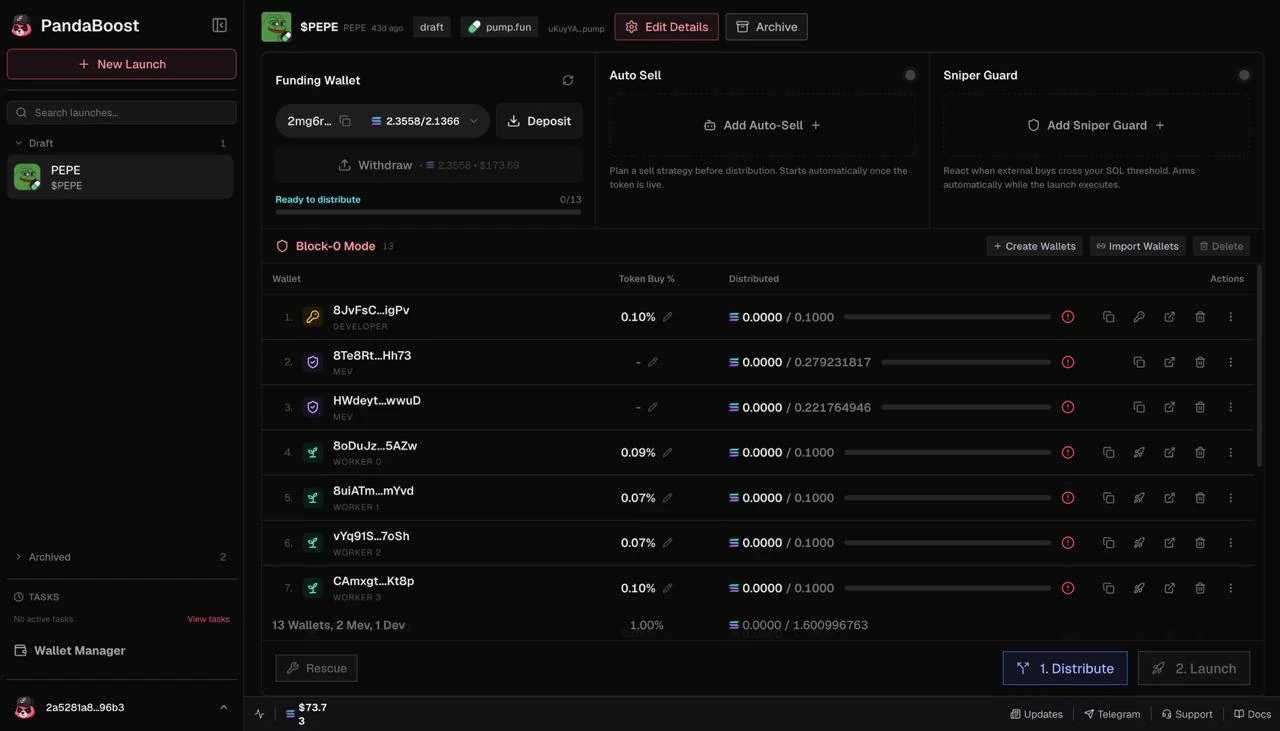
Panda Bundler’s current launch workspace brings the main Pump.fun setup steps into one screen. You enter the token details, choose supply and deployer-buy settings, prepare a batch of holder wallets, set the buy allocation for each wallet, and review the calculated funding requirement before execution.
| Step | What you configure | What to verify |
|---|---|---|
| Create launch | Token details, total supply, and deployer buy | Metadata, amounts, and the selected launch mode |
| Prepare wallets | Generate new wallets or import wallets you control | Labels, permissions, and backup handling |
| Allocate buys | Buy amount or percentage for each wallet | Total allocation and available balance |
| Fund | Send SOL to the workspace funding wallet | Calculated requirement plus network costs and tips |
| Distribute | Push the configured SOL allocation to the wallet batch | Final balances before signing or submitting |
| Launch | Choose whether to use Block-0 Mode, then execute | Submission status and final on-chain records |
Block-0 Mode. The control groups the launch and configured first buys into a coordinated submission flow. It controls packaging and timing settings; it does not guarantee first-block inclusion, ordering, protection from outside buyers, or successful landing. Where Jito submission is used, a bundle ID confirms receipt rather than landing, so verify the resulting transactions in an explorer.
Funding. You fund one workspace wallet, and Panda Bundler calculates the requirement from the allocations you entered. Distribution settings remain configurable, but every transfer is public on Solana. Keep seed phrases and private keys out of support chats, verify addresses, and test the complete flow before using it for a live launch.
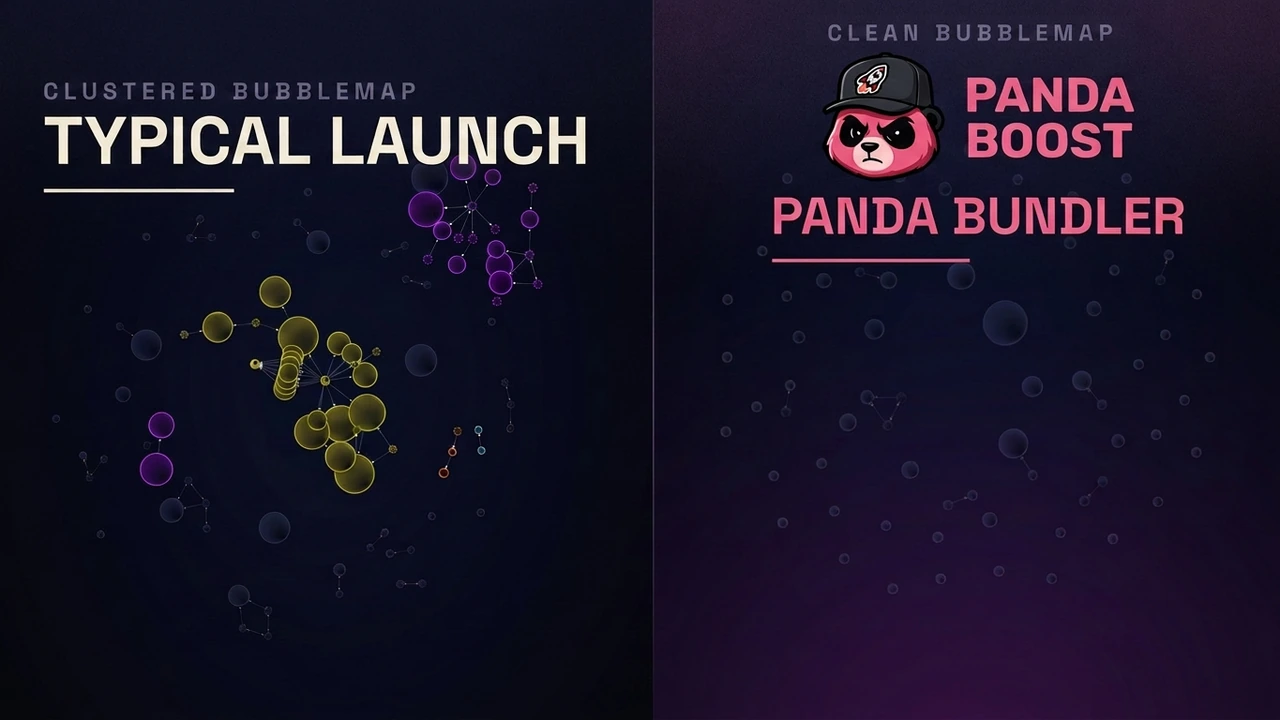
Clean Bubblemaps. Developers use the phrase for a wallet map that does not collapse into one obvious, tightly connected cluster. The pattern matters because Bubblemaps is a common part of launch due diligence. Panda Bundler moves the allocation decision before launch: you set each wallet’s amount, fund one wallet, distribute the planned allocation, and launch with the spread you configured. “Clean” describes the distribution pattern rather than hidden activity; public Solana transactions remain readable by analytics tools.
Panda Bundler is invite-only, so there is no email signup. The key is issued through PandaBoost Support and used on the dedicated launch platform.
Post-Launch Trading and Automation
Once the launch is confirmed, the same workspace becomes the operating terminal. The current Panda Bundler interface combines a TradingView chart, a live trade feed, your own fills, a wallet list, and order controls. That continuity is the main difference between a one-purpose Pump.fun bundler bot and a broader launch platform.
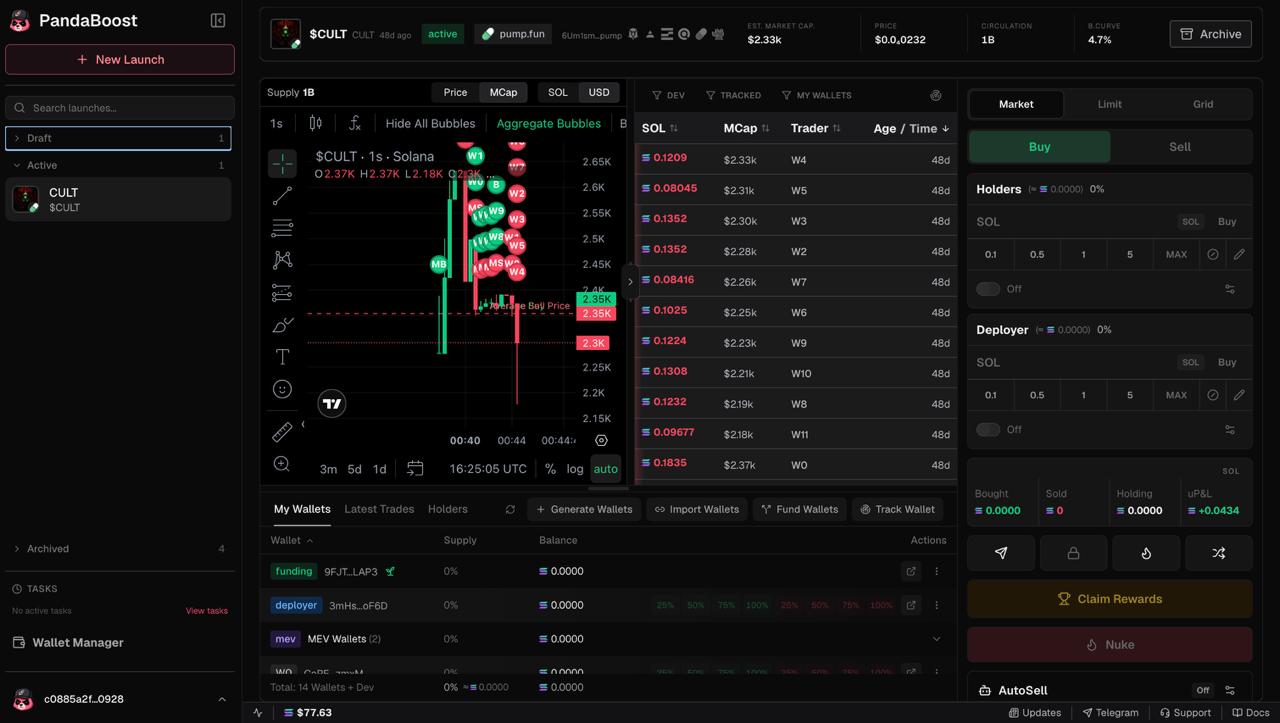
- Market, Limit, and Grid. Choose the order workflow that matches the action you want to take instead of moving immediately to a separate trading tool.
- Wallet controls. Generate, import, fund, and track wallets from the terminal. Holder and deployer groups keep the operator’s own addresses organized.
- Auto Sell. Set the supported sell conditions in advance, then review them against current liquidity and slippage before enabling automation.
- Sniper Guard. Set a threshold for outside buying activity. When the threshold is crossed, the configured automation can stop buying or initiate the selected sell response. It reacts to observed activity; it does not prevent that activity.
- Claim Rewards and Nuke. These visible terminal controls support reward claiming and a one-action multi-wallet sell path. Review the selected wallets and expected execution before confirming either action.
The terminal is also the audit trail for your own workflow. Chart markers and the trade feed help you compare what you intended with what actually landed. The wallet list keeps balances and operator-controlled addresses in view before the next order is prepared. A launch submission, an open automation rule, and a completed trade are different states; check each one separately.
Automation reduces repeated clicks, not responsibility. Conditions can change between configuration and execution, and multi-wallet orders can create material price impact. Check balances, liquidity, slippage, and transaction status before and after every large operation.
Fees and Access
Nothing here is hidden. Bundled buys settle on Solana like other transactions, and the funding wallet, distribution, and holder-wallet activity can be inspected on-chain. Treat promises such as “undetectable,” “untraceable,” “sniper-proof,” or “guaranteed first block” as claims no interface can enforce.
Panda Bundler pricing, confirmed July 2026: no subscription, no Panda Bundler fee on buys, and no per-trade platform fee. PandaBoost takes a 5% platform fee on sells. Solana network fees, priority fees, bundle tips, protocol fees, and third-party costs are separate and may still apply. Confirm current terms before funding because product settings and external costs can change.
The platform does not promise transaction inclusion, scanner invisibility, buyers, a particular chart shape, or profit. Its practical value is control: launch configuration, wallet administration, chart monitoring, and post-launch trading remain in one browser workspace.
A submitted request can still fail to land, and market conditions can change before an automated order executes. Keep enough SOL for network costs, review slippage and wallet selections, and never send a private key or seed phrase to support.
Access is issued through support. There is no Telegram bundler bot, no Wallet Connect login, and no email/password signup. Request an invite key through PandaBoost Support, then enter it at launch.pandaboost.app.
After the token is live, promotion is a separate decision. The token launch marketing services guide maps PandaBoost’s current visibility options without presenting them as part of bundle execution.
Launch and Trade in One Workspace
Request an invite key and confirm the current Panda Bundler workflow with support.
FAQ
A Solana bundle is the transaction mechanism. A bundler bot automates a defined launch, buy, or sell task. Panda Bundler is a wider web platform for Pump.fun launch setup, wallet management, chart monitoring, and post-launch trading.
Panda Bundler has no subscription, no platform fee on buys, and no per-trade platform fee. PandaBoost takes a 5% platform fee on sells. Solana network fees, priority fees, bundle tips, protocol fees, and third-party costs are separate.
‘Clean Bubblemaps’ is developer shorthand for a wallet distribution without one obvious, tightly connected cluster. Panda Bundler provides per-wallet allocation and distribution controls designed for a cleaner pattern, but funding transfers, wallets, buys, and sells remain public Solana activity.
Request an invite key from PandaBoost Support and enter it on the dedicated launch-platform sign-in page. Panda Bundler runs in the browser; there is no email/password signup, Telegram bundler bot, or Wallet Connect login.

Whatever stage you're at — we're the stack.
Pre-launch? Bundle safe, warm wallets, fund quiet.
Post-launch? Trend on every scanner, chart and feed that matters.
The launch window is short. Don't waste it.