
Flap Launchpad: How to Launch a Token on BNB Chain

A Flap launch on BNB Smart Chain comes down to a few decisions: the launch currency, the token's tax settings, the participating wallets and the funds needed for the setup. Panda Bundler brings these into one configuration path, with a launch summary visible through both setup stages shown here.
This guide works through the Launchpad and Token stages using a BNB Smart Chain example. You'll see where to select Flap, how to review separate buy and sell taxes, what token details to prepare, and how to read the funding summary before moving to launch review.
Quick answer: choose BNB Smart Chain and Flap, review the launch currency and separate buy/sell taxes, enter the token details, and continue to the launch review. Check the selected mode, wallet allocation and current funding requirement before authorizing on-chain actions.
Flap on BNB Chain
Flap is an EVM token-launch protocol with tax-token and non-tax-token workflows. A launchpad provides a particular route into trading; it is not simply another name for deploying a BEP-20 token contract. The token version, launch settings and later liquidity path matter.
For a BNB Chain launch, start by checking the network rather than assuming that every EVM screen uses Ethereum. In Panda Bundler, the first screen is Where are you launching? The supplied example has BNB Smart Chain selected, with Flap as the launchpad and BNB as the launch currency.
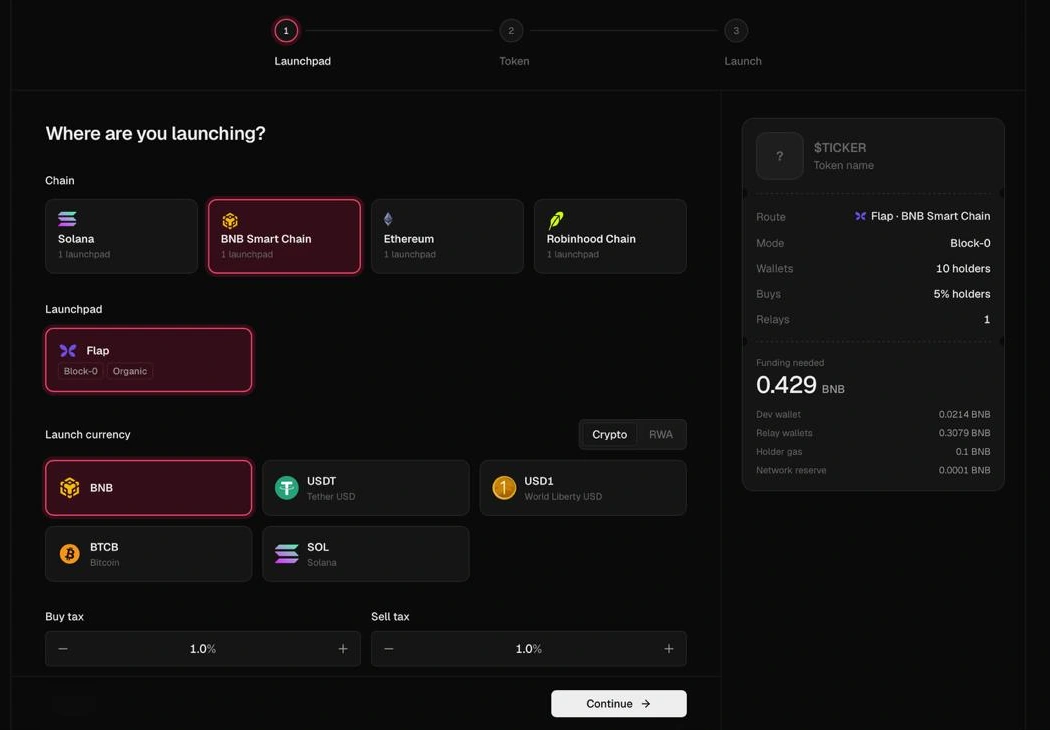
The Flap card displays Block-0 | Organic, while the example's summary shows Block-0. Those labels identify available launch-mode choices and the selected configuration. They do not establish guaranteed first-buy execution or protection from other traders. Review the mode's current controls before relying on a particular launch sequence.
- Select BNB Smart Chain. Confirm that the route summary also names that network.
- Select Flap. Keep the launchpad choice consistent with the workflow you intend to use.
- Review the launch currency. The example selects BNB. Use the asset required by the chosen route; a currency label does not mean the transaction is bridged to that asset's native chain.
- Read the summary before continuing. Route, mode and funding should describe the launch you are actually preparing.
The three stages shown in the workspace are Launchpad → Token → Launch. Treat them as separate decisions: select the route first, define the token second, and review the launch configuration before funding or execution.
Token and Tax Settings
The next screen, What are you launching?, contains the image upload, name, ticker, description and project links. Prepare these before proceeding. A consistent identity makes the resulting token easier to recognize across its launchpad page, explorers and trading interfaces.
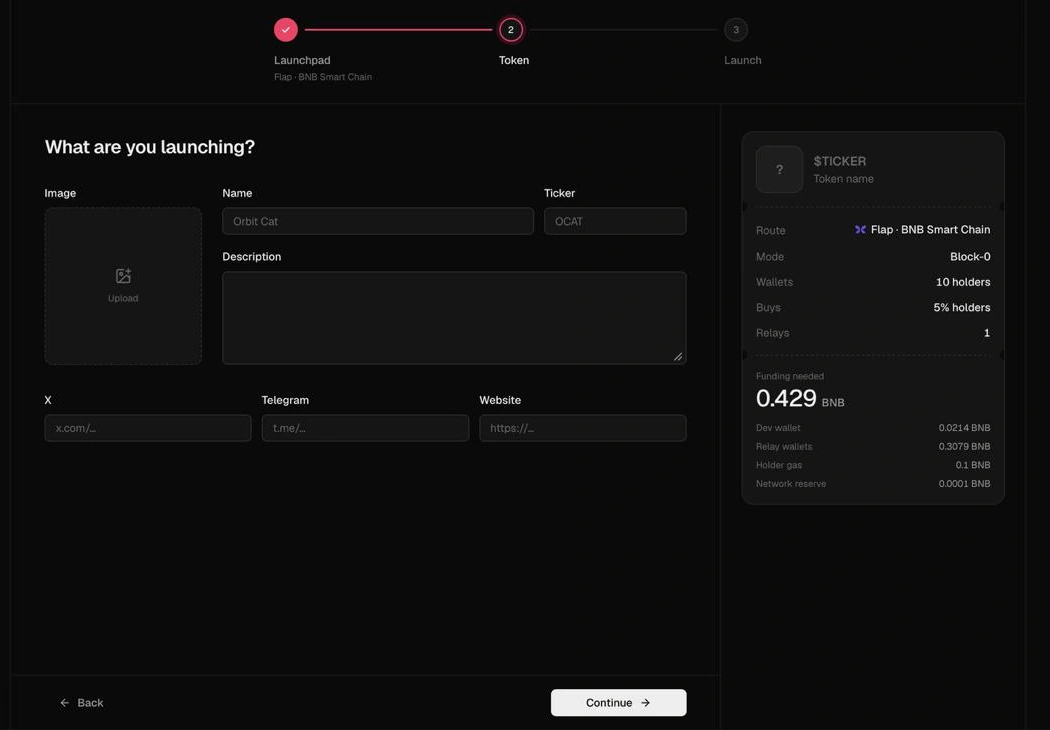
- Image: use the project's own artwork and check its preview.
- Name and ticker: check spelling and consistency. A matching ticker alone does not identify the same contract.
- Description: state what the project is, without claims the token cannot substantiate.
- Links: enter the intended X, Telegram and website destinations. Test them before submitting.
Flap supports tax-token configurations, and Panda Bundler's supplied screen has separate Buy tax and Sell tax controls. Both display 1.0% in this example. That is the configuration shown, not a universal requirement, recommended rate or proof that every token version has the same settings.
A token tax is contract-level logic that deducts an amount on applicable transfers or trades. It is different from the launchpad's trading fee, a network transaction charge and Panda Bundler's platform fee. It is also not a statement about a user's legal tax obligations.
Before choosing a tax configuration, decide what it is intended to fund, which actions trigger it, where the proceeds go and whether the rates can change. Do not assume that increasing slippage removes a token tax: these are different mechanisms, even when both affect the amount a trader receives.
Flap's current technical documentation distinguishes token versions and launch entry points, including tax-token and non-tax paths with different migration capabilities. Use the options actually exposed for the selected route. Do not copy parameters from a different token version or treat one screenshot as a complete catalogue of Flap's protocol features.
Wallets and Launch Budget
Before funding, assign a purpose to each account. A dev wallet, a funding account, participating wallets and any fee recipients can have different responsibilities. Keep control of keys and intended allocations clear; additional addresses do not represent additional independent buyers.
The supplied summary shows 10 holders, a 5% holders buys setting and 1 relay. These are example configuration values. They are not minimums, a universal wallet limit or a claim that ten unrelated holders have bought the token. Check the detailed settings to understand what each percentage is applied to before committing funds.
The displayed funding requirement is 0.429 BNB. That number belongs to the illustrated setup. It is neither a fixed Flap launch price nor a standalone Panda Bundler commission. The summary separates several funding categories:
| Summary item | What to check |
|---|---|
| Dev wallet | The amount assigned to the developer-wallet part of the configured launch. |
| Relay wallets | The funding assigned to relay-wallet operations in this setup; inspect the selected mode and allocation. |
| Holder gas | The native-asset provision for the configured holder-wallet transactions. |
| Network reserve | The displayed reserve and whether the current calculation remains sufficient. |
Review the current calculation after changing the currency, mode, tax settings or wallet plan. Capital allocated to a wallet is not automatically a fee, and a funding estimate is not a promise that all external costs remain fixed until execution.
Separate three questions: how much capital the setup needs, which transactions consume that capital, and which amounts are actual fees.
Panda Bundler has no subscription or buy fee; its platform fee applies to sells. Confirm the applicable sell rate and review the transaction calculation. Network, protocol and other third-party charges remain separate. BNB Chain funding should not be explained using SOL balances or Jito-tip examples from a Solana guide.
Launch with Panda Bundler
Panda Bundler brings token setup, wallet preparation and trading controls into one web workspace. For a Flap launch, the useful handoff is continuity: keep the selected network, token identity, wallet roles and funding plan aligned as you move from configuration into launch review.
Access is provided through an invite or support key. Open the workspace, select the Flap route, complete the token details and continue to the Launch stage. The screenshots cover setup through the Token stage. Complete the remaining review in your own session and confirm its figures before submitting.
Before execution, run a short final check:
- Identity: the artwork, name, ticker and links belong to the intended project.
- Route: Flap, BNB Smart Chain, currency and selected mode agree across the setup and summary.
- Economics: the tax configuration, wallet allocation, required capital and separate fees are understood.
- Authorization: only the intended accounts and transactions are included. Never send private keys or recovery phrases to support.
- Verification: after submission, inspect task status and the resulting on-chain transaction or token address. Do not equate a button click or submitted task with a completed launch.
For post-launch work, use the controls available for that specific network and venue rather than assuming every Solana feature also applies to Flap. The broader workspace includes wallet management, trading and automation; confirm the active route's supported actions before planning a workflow around them.
First launch with Panda Bundler? New users can request 0% Panda Bundler fees for their first launch. Ask support to activate the offer before starting. Network, protocol and other third-party costs still apply. See Panda Bundler fees for the offer's scope, or open the workspace to explore the launch setup.
Launching on another network? Use the Solana Bundler Guide for the separate Pump.fun workflow, or the Pons launchpad guide for Robinhood Chain. Their route-specific mechanics should not be copied into a Flap BNB launch.
First Launch, 0% Panda Bundler Fees
Prepare your Flap launch in one workspace. Request the offer before starting; network, protocol and third-party costs remain.
FAQ
The supplied Panda Bundler screens show Flap on BNB Smart Chain, including launch-currency selection, separate buy/sell tax controls and token details. Open the workspace with your invite or support key, select the route and review the controls available for your launch.
There is no single total that applies to every setup. Review the current wallet-funding calculation, selected network and currency, token taxes, protocol charges and Panda Bundler sell fee. The 0.429 BNB shown in this guide is an example funding calculation, not a fixed launch price.
No. Token buy/sell taxes, protocol charges, network costs and Panda Bundler fees are separate. The illustrated buy and sell tax controls both show 1.0%; those settings should not be treated as a required rate or the Panda Bundler commission.
Prepare the token image, name, ticker, description and project links. Decide the role and allocation of each participating wallet, select the intended route and currency, and review the current funding requirement before authorizing transactions.
Yes, on request. New users can ask PandaBoost support to activate 0% Panda Bundler fees for their first launch before starting. Network, protocol and other third-party costs still apply.
Related readings


Whatever stage you're at — we're the stack.
Pre-launch? Bundle safe, warm wallets, fund quiet.
Post-launch? Trend on every scanner, chart and feed that matters.
The launch window is short. Don't waste it.