
What Is Fomo App? Social Trading and Token Discovery

Fomo is a crypto trading app available on mobile and the web at fomo.family. It combines token discovery with a social feed, trader profiles and trading controls. Here, “Fomo” refers to the application—not the fear-of-missing-out emotion that gives it its name.
For someone exploring the app, the useful question is how those parts fit together: where you discover a token, what you can learn from other traders and what you still need to check before placing an order. For token teams, those same screens show different discovery contexts—not a published recipe for reaching Trending.
This walkthrough uses three supplied screenshots of the real interface and the platform’s official product description. It is an interface explainer, not an independently executed trading test. Token values and public trades pictured are snapshots, not current quotes or recommendations.
What Fomo Adds
Fomo describes itself as a social-first crypto trading platform. Its official website presents a feed for discovering and following traders, notifications about trading activity, a leaderboard and mobile and web access.
That combination matters because discovering a token and deciding whether to trade it are different tasks. A token list introduces an asset. A public trade or written thesis provides another person’s context. An order screen lets the user prepare an action. None of those screens, by itself, proves that the asset is safe or that another trader’s result can be repeated.
The practical distinction is not simply “an app with charts.” Fomo puts trading activity and social information within the same product. Users can encounter an asset through a market-oriented list or through another person’s activity rather than relying on a ticker alone.
For project teams, it helps to distinguish these surfaces before discussing visibility. Being present in a token list, appearing in a public trade event and being highlighted in a promotional banner are different observations. One screenshot does not establish how a platform selects entries for all three.
Home Screen
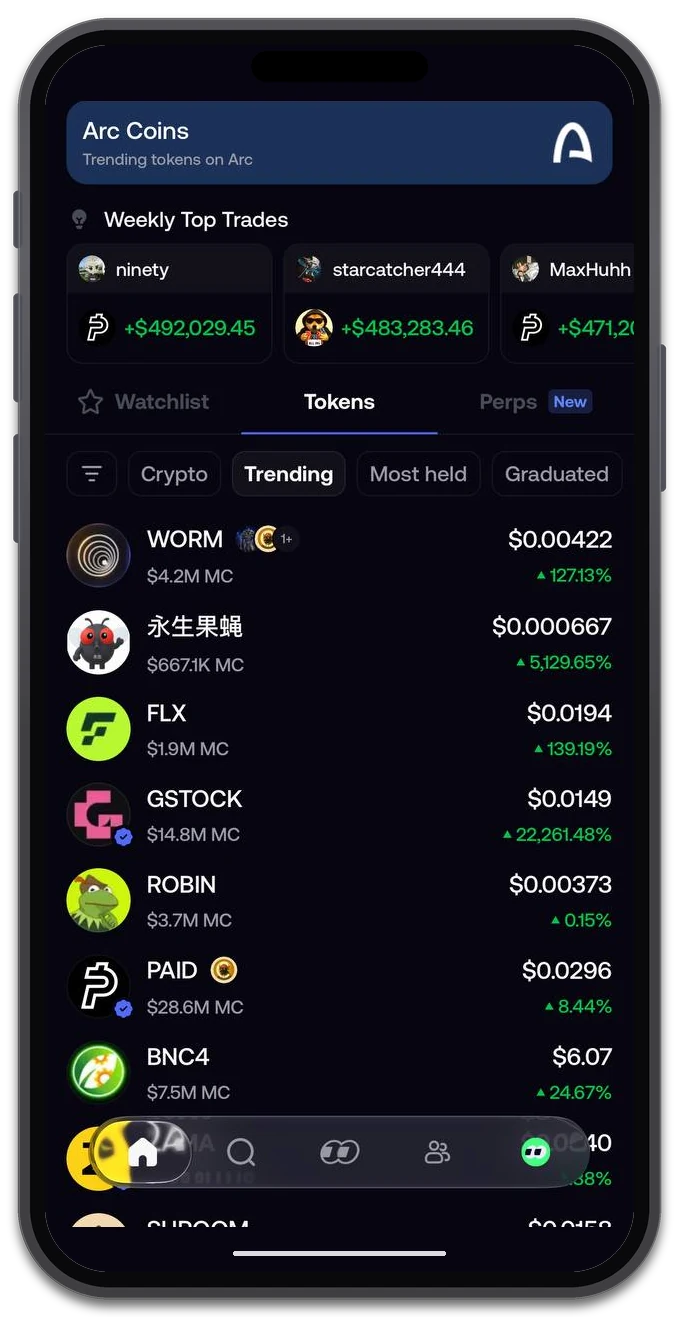
Fomo’s home screen shows an Arc Coins banner, Weekly Top Trades and the Tokens discovery area. The personal account balance is hidden for privacy.
The supplied home screen contains three distinct elements:
| Surface | What the screenshot shows | What not to infer |
|---|---|---|
| Arc Coins | A dedicated banner highlighting tokens on Arc | That every token further down the page belongs to Arc |
| Weekly Top Trades | Highlighted trader results in a separate row | Typical returns or results a new user can reproduce |
| Tokens → Trending | A token list with market information | A disclosed ranking formula or guaranteed route into the list |
The distinction is easy to miss on a small screen. The Arc banner sits above the discovery area, but the visible selection below is the general Trending filter. It should not be described as an Arc-only token list without checking the active network selection.
Other visible navigation choices include Most held and Graduated. These are separate labels, not interchangeable definitions of Trending. The screenshot establishes that the controls are present; it does not establish their calculation rules or refresh intervals.
When opening a token from a discovery surface, verify its identity and intended network rather than relying on the name or artwork. Tickers can be reused. A contract address is the more precise identifier when checking a token against the project’s official information.
For teams researching Fomo, this screen is useful evidence that the app has several ways to expose assets. It is not evidence of a PandaBoost placement service or a way to buy a particular rank.
Social Feed
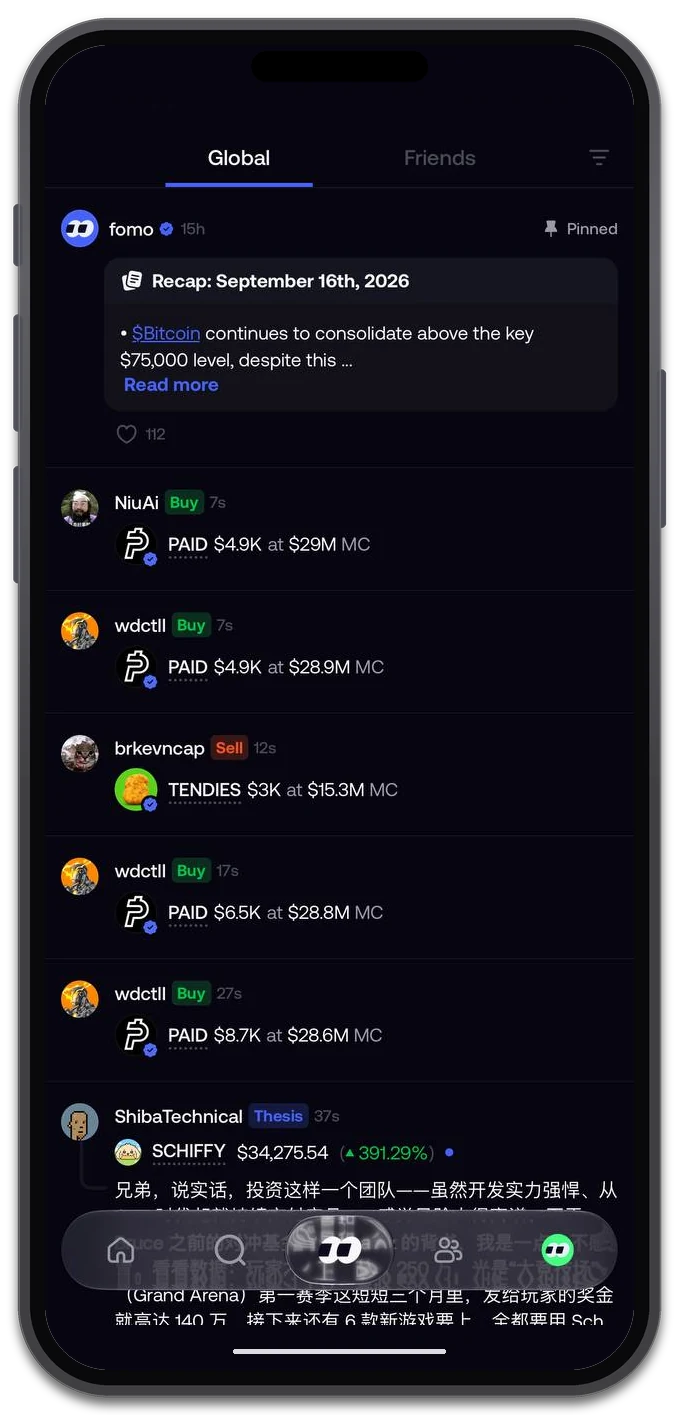
The Global feed combines public trade events and written posts. The pictured activity belongs to public profiles; it is not a record of trades executed for this article.
The second screenshot shows Global and Friends tabs. In the selected Global feed, entries include buys, sells and a post marked Thesis, alongside an official Fomo post. Trade entries display a profile, token, action and contextual figures.
This is a different discovery route from browsing Trending. A reader encounters an asset through someone’s activity or explanation. The official website also describes following traders and receiving notifications about what they buy.
A visible trade should still be read narrowly. It can tell you what the interface reports about that event. It does not show every position the person holds, their full risk exposure or why a later reader should make the same decision. Likewise, a profitable highlight is not evidence of a typical outcome.
Before acting on a feed entry, ask:
- Is this an executed trade event, a written opinion or a platform announcement?
- Does the token identity match the asset you intend to inspect?
- How old is the activity, and has the market changed since then?
- What can you verify independently beyond the account’s post?
For token teams, social context should not be confused with independent endorsement or platform approval. A broader meme coin marketing plan still needs accurate project information and clear official destinations. This article does not attempt to infer how Fomo distributes individual posts.
Order Entry
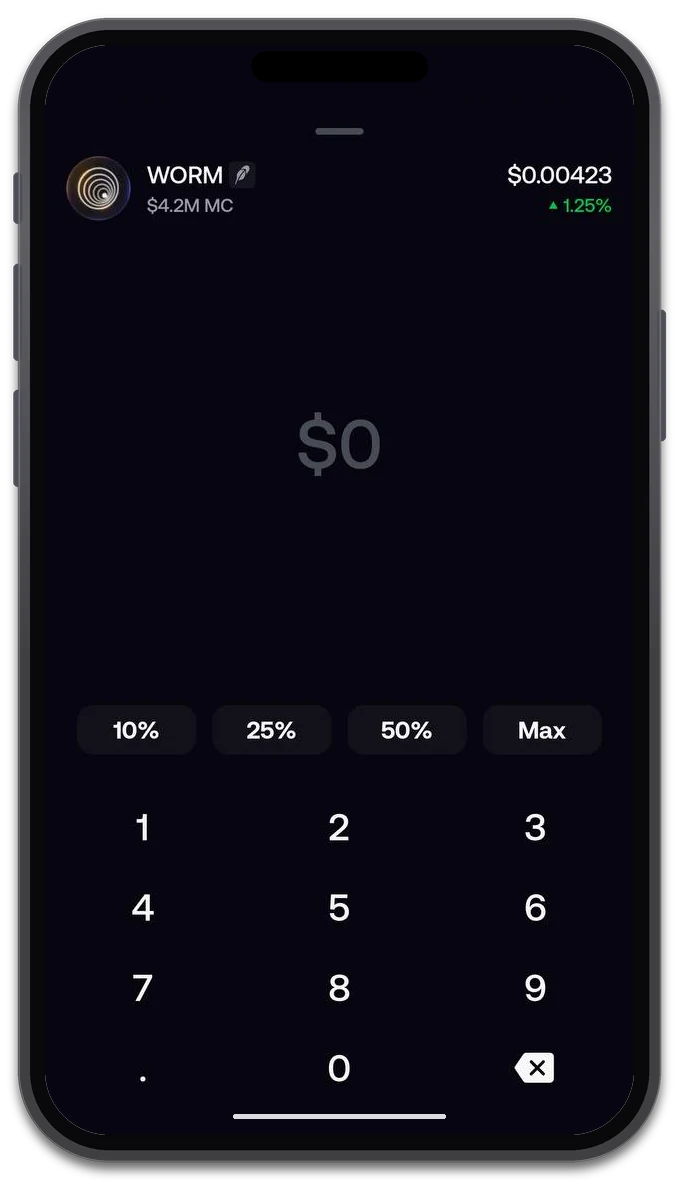
An amount-entry screen for WORM, showing percentage shortcuts and a numeric keypad. No completed order is shown; the available balance is hidden for privacy.
The third screenshot shows the step where a user enters an amount. The field is at zero, with percentage shortcuts and a numeric keypad. The interface asks for an amount rather than presenting a completed transaction.
That is an important boundary for this walkthrough: opening an order screen is not proof that a trade executed. The screenshot also does not display a fee breakdown or verify a referral discount. It should not be used to claim fee-free trading, a particular execution price or completed settlement.
Before confirming a real order, review the information available in the subsequent flow:
- Check the token and network against your intended destination.
- Review the amount and any available quote or execution settings.
- Read the applicable fees and terms before approving the action.
- After submission, check the resulting status rather than assuming that a tap means completion.
Market movement, liquidity and price impact can affect a trade. Another user’s earlier entry price is not a quote for your own order.
For token founders and marketing teams, Fomo is worth understanding as a discovery channel—not just another place to trade. Trending lists, network-specific features and public trade activity give users different ways to encounter a token. Explore Fomo to see those surfaces in context. (Referral link.)
In upcoming breakdowns, we’ll look more closely at Fomo Trending and token visibility: what the discovery screens show, what teams should check before planning a campaign, and how Fomo fits into a broader token-promotion strategy.
Plan Token Visibility
Compare PandaBoost trending and discovery services for a token launch.
FAQ
Fomo is a crypto trading app on mobile and the web at fomo.family. It combines token discovery lists with a social feed, trader profiles and trading controls in one product.
No. Here “Fomo” is the name of the application. The emotion gives the app its name, but this article describes the product interface.
The app shows Trending, Most held and Graduated as separate discovery filters. The screenshots confirm the controls exist; they do not disclose a ranking formula, refresh interval or a way to buy a position in the list.
No. The amount-entry screen only prepares an order. Check the token, network, amount, fees and the resulting status in the subsequent flow before assuming anything settled.

Whatever stage you're at — we're the stack.
Pre-launch? Bundle safe, warm wallets, fund quiet.
Post-launch? Trend on every scanner, chart and feed that matters.
The launch window is short. Don't waste it.