
How to Get Your Token Trending on DEXTools

PandaBoost offers DEXTools Trending campaigns for token teams that want more pair-page views and visibility around a launch, announcement or project update. Packages start at $600 for 12 hours, with 12-hour and 24-hour options across Ethereum, BSC, Robinhood, BASE, Elysium and Solana.
The service is listed in the PandaBoost catalog as DexTools Trending Hot Pairs, with a Top 1–10 target. DEXTools controls the live list, so that target is not a promise of one fixed position. The practical steps are to prepare the correct pair, meet the service requirements, choose your window and keep track of the campaign.
Prepare Your Pair
Getting a pair indexed and promoting it in Hot Pairs are different tasks. An indexed pair has a page people can open. Hot Pairs is a discovery surface where traders find active pairs and decide which ones to investigate.
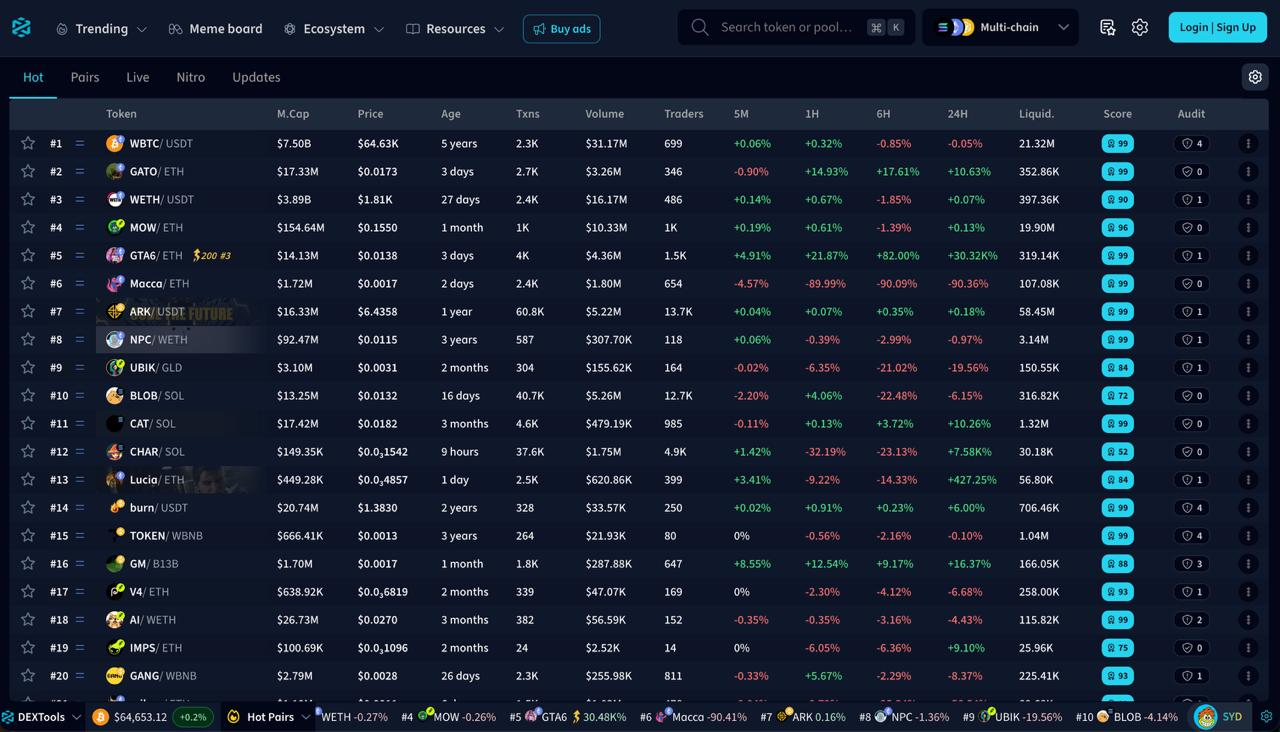
The redesigned DEXTools interface gives that discovery step a clear place in the workflow. Its Hot view brings ranked pairs together with market cap, price, trading activity and liquidity, while the Multi-chain selector remains in the header. Visitors can scan the market overview before opening a pair for closer research. For a token team, this is a discovery screen worth preparing for alongside the pair page itself.
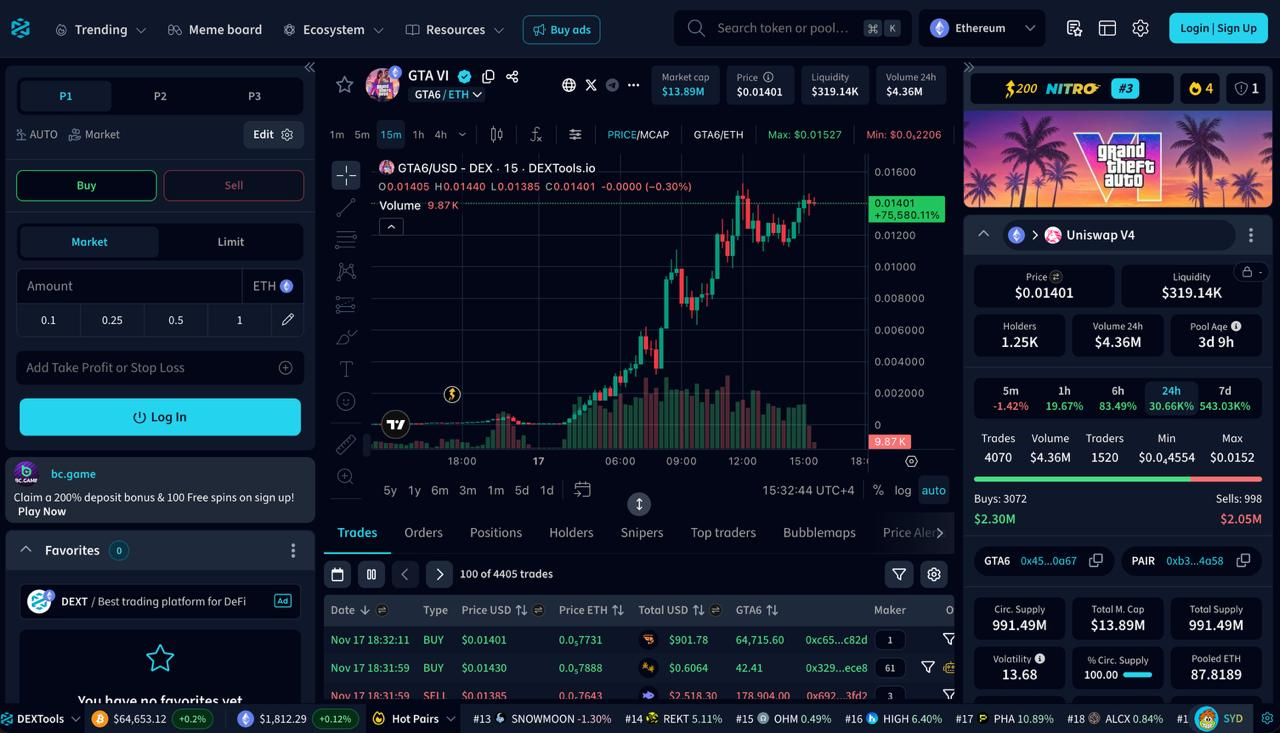
Opening a pair takes the visitor into its chart and research page. The redesigned workspace brings the price chart, pool statistics and recent trades together, so someone discovering your token can inspect the market before deciding what to do next. Prepare the exact pair page you want that visitor to open, not just the token name in a promotion brief.
The Hot Pairs explanation from DEXTools describes pairs showing high trading volume or rapid price increases. That description is useful context, but it is not a published formula for buying or calculating a rank.
Start with the pool you actually want to promote. A token can have several pools with different liquidity and activity. Record the network, token contract, pool and DEXTools pair URL, then check that they identify the same market.
Before ordering:
- Open the pair page and confirm the token and pool are correct.
- Update the token information, including the project website and community links.
- Check the liquidity, volume and DEXScore conditions listed for your order.
- Prepare the announcement and pair link your team will share during the campaign.
Look at the page as a new visitor would. The project name, logo and links should be consistent with your website and social accounts. People who arrive at the pair need a clear next step, whether that is learning about the project, reading the update or joining its community.
If you are planning DEX Screener promotion too, save its matching pair URL separately. Check the network and pool on both websites rather than assuming that the first result for your ticker is the right one.
Prices & Requirements
Each DEXTools order covers one selected network and a 12-hour or 24-hour window. These are the prices shown in the PandaBoost order form:
| Network | 12 hours | 24 hours |
|---|---|---|
| Ethereum | $600 | $900 |
| BSC | $600 | $900 |
| Robinhood | $700 | $900 |
| BASE | $700 | $900 |
| Elysium | $700 | $900 |
| Solana | $900 | $1,200 |
The service includes boosted pair views on DEXTools and increased visibility to active traders. Choose the duration around the update you want to promote and the budget available for it.
A 12-hour campaign suits a focused announcement window when your team will be active. A 24-hour campaign gives the promotion a longer window across time zones. The longer option is a duration choice, not a promise of a higher live position.
Check eligibility before paying:
| Network group | Liquidity (LP) | Volume (VOL) |
|---|---|---|
| SOL | 20k+ | 50k+ |
| ETH/BSC | 150k+ | 50k+ |
| Other chains | No minimum listed | No minimum listed |
The form also requires updated token information and DEXScore 51+. It marks other chains as “no req” in the LP/VOL requirements; that does not remove the separately listed token-information and DEXScore conditions.
These figures are the campaign requirements set by PandaBoost, not disclosed DEXTools ranking thresholds. Do not assume that meeting a minimum produces a particular Hot Pairs position. Prices and conditions can change, so confirm the selected order card before payment.
Choose your DEXTools campaign. Compare the network and duration options in the Web Panel.
Run Your Campaign
The PandaBoost New Order screen brings the service description, prices and requirements together before you select an order type.
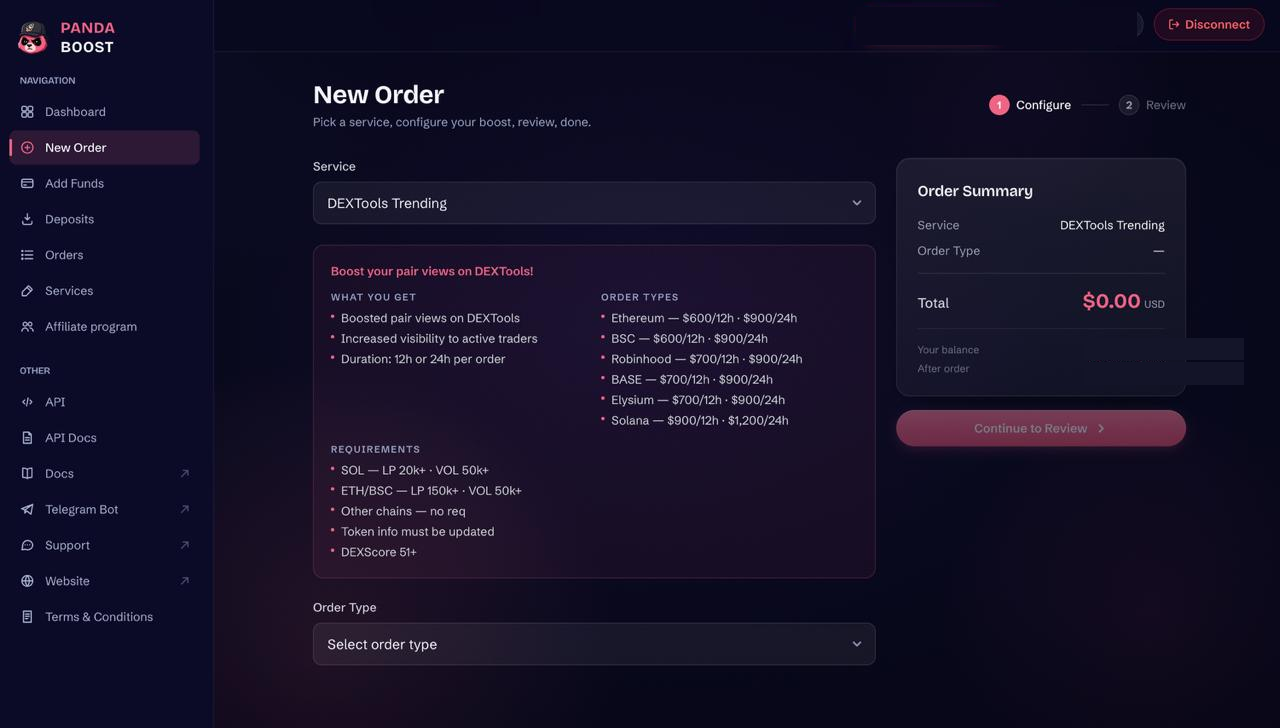
- Open the Web Panel and start a new order.
- Select DEXTools Trending in the Service field.
- Choose the network and duration in Order Type.
- Provide the identifier requested for your selected order. Keep the token contract and correct pair URL ready, and check the network before continuing.
- On Review Your Order, check the service, order type, token and selected pair, chain and total cost. Use Back to correct the selection or Confirm Order when the details are right.
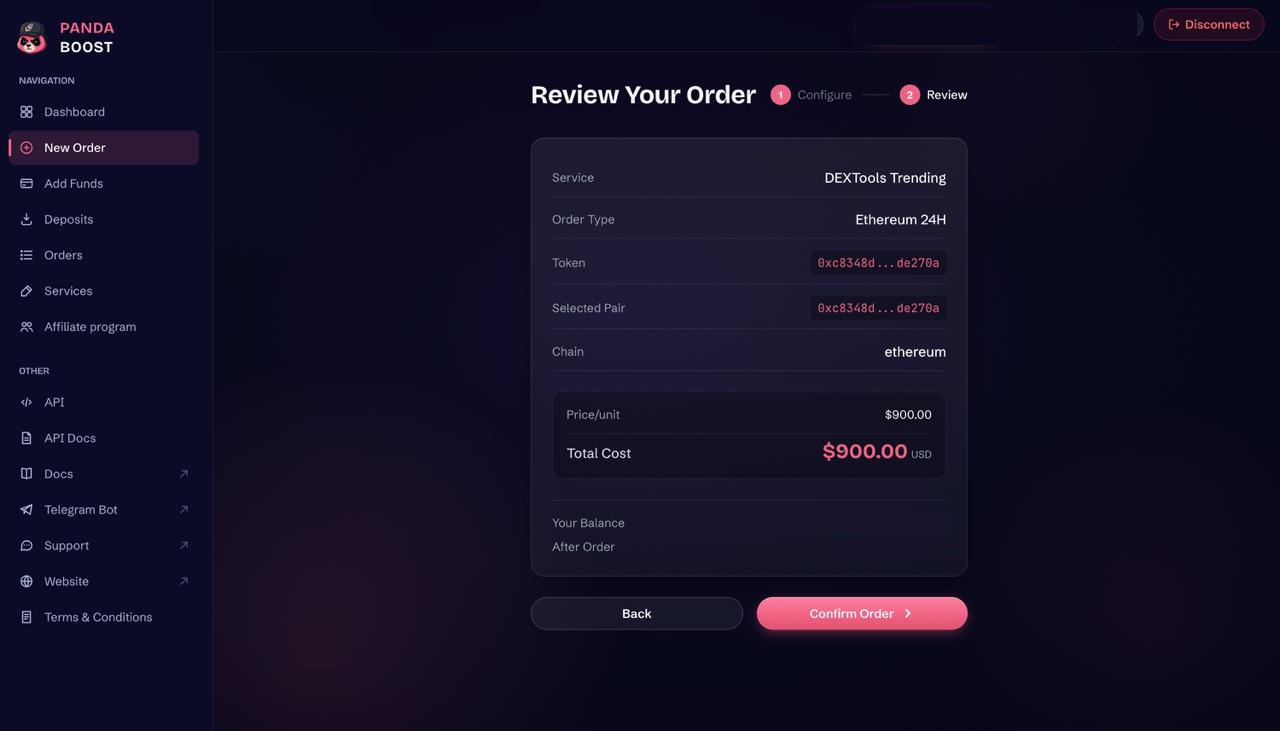
Keep the confirmation and order reference. If your announcement depends on a particular start time, confirm the activation arrangements for the service before committing to that schedule.
Prepare your own communications alongside the campaign. Use the same correct pair link in relevant posts, keep the announcement easy to find and have someone available to answer questions. Promotion gives the pair a visibility opportunity; the project page and your update explain why a visitor should keep reading.
For monitoring, record a baseline before the window starts: the selected Hot Pairs view, the position of your pair or its absence from the list, and the timestamp. Check the same view during the campaign so you are comparing like with like.
Separate what you observe:
- Delivery and visibility: the selected service, campaign window, order status and live-list snapshots.
- Page engagement: pair views or other interactions where the platform exposes them.
- Market response: trades, liquidity, holders and token-price movement.
Buyers and price growth are not guaranteed consequences of a visibility campaign. A price move alone also does not show which part of your marketing caused it. Save the observations you can verify and use them to decide whether to repeat the campaign for your next update.
Ready for Hot Pairs? Select your network and campaign window.
Add DEX Screener
A DEXTools Hot Pairs campaign and a DEX Screener Trending campaign target different discovery interfaces. Adding DEX Screener lets your team support the same announcement on a second platform, with its own pair page ready for visitors.
The DEX Screener Trending service from PandaBoost targets Top 1–10 visibility. Its order card lists these packages:
| Package group | Price and duration |
|---|---|
| SOL | $1,200 / 12h or $1,600 / 24h |
| EVM (ETH / BSC / Base / Other) | $1,000 / 24h |
| Other Chains (non-SOL) | $1,000 / 24h |
Check DEX Screener eligibility separately:
- SOL: MCAP 80k+ and VOL 300k+.
- ETH/BSC: LP 30k+ and VOL 150k+.
- Robinhood: MCAP 40k+ and VOL 100k+.
- Other Chains: no requirement listed in this part of the card.
Token information must be updated. These conditions differ from DEXTools: the SOL threshold here is market cap, not the liquidity minimum shown for the DEXTools service.
Delivery conditions matter during the campaign. The IMPORTANT section of the DEX Screener order card states:
- If market cap drops below $60k, the order is paused and resumes above $80k.
- A price drop of 80% or more invalidates the refund.
- If stats fall below the requirements, DEX Screener may remove the token from trending; no refund applies in that case.
Read those conditions alongside the requirements for your selected order type before paying. Do not carry the eligibility or refund conditions of one platform over to the other.
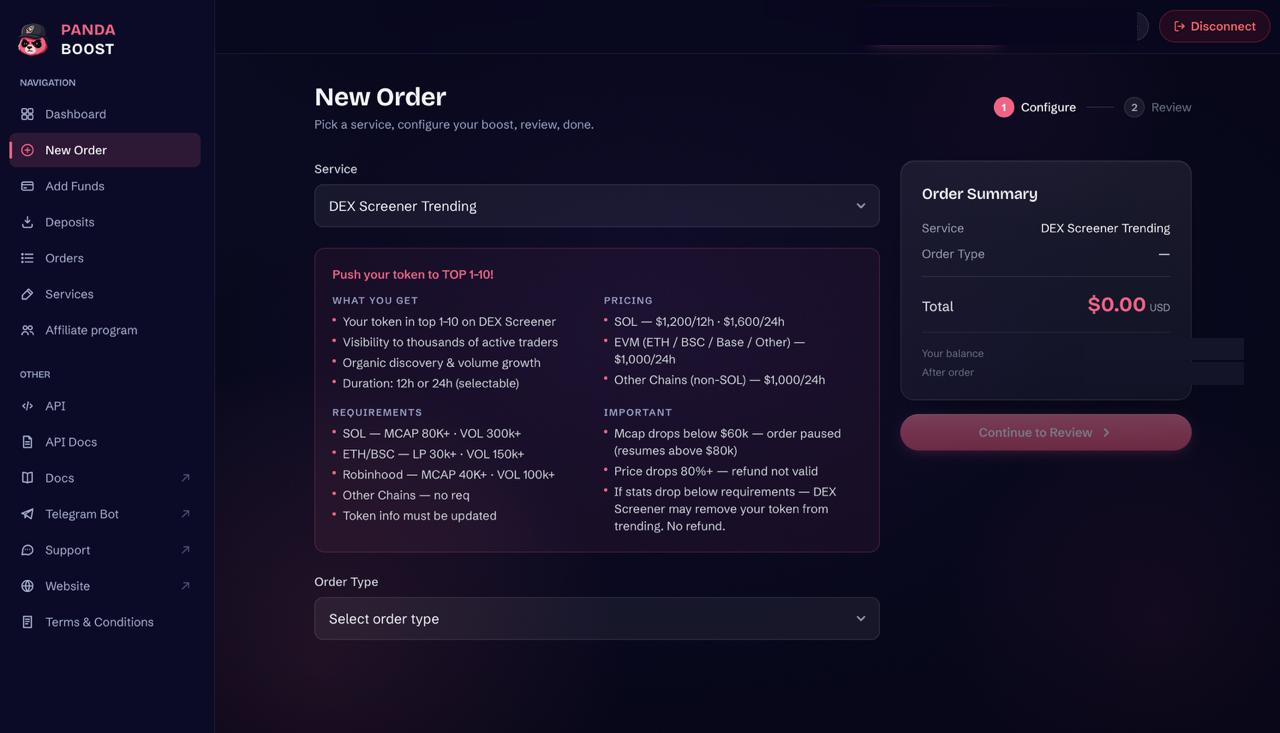
Both services are listed in the PandaBoost Web Panel. Treat them as separate order choices rather than assuming a DEXTools booking automatically includes DEX Screener. Official DEX Screener Boost packs are also a different purchase from the DEX Screener Trending service offered by PandaBoost.
Already running DEX Screener? Add DEXTools to bring Hot Pairs into the same promotion plan. Check the matching pair and the DEXTools requirements before ordering.
For one announcement, review the activation terms for each service before planning overlapping windows. The audiences can overlap, so two platforms do not mean twice as many distinct people. The benefit is coverage across two discovery interfaces.
If you need a broader budget decision first, use the DEXTools vs DEX Screener comparison.
Build your promotion around the pair and the update. Start with DEXTools Hot Pairs, then add DEX Screener when your plan calls for a second platform.
Start DEXTools Trending
Choose a 12-hour or 24-hour campaign for your network. Packages start at $600 for 12 hours.
FAQ
PandaBoost packages start at $600 for 12 hours on Ethereum or BSC. Prices depend on the network and whether you select a 12-hour or 24-hour order; the full table above covers all six available network options.
The order form lists Ethereum, BSC, Robinhood, BASE, Elysium and Solana. Each has a 12-hour and a 24-hour option.
The form requires updated token information and DEXScore 51+. SOL also needs LP 20k+ and VOL 50k+, while ETH/BSC needs LP 150k+ and VOL 50k+; other chains have no listed LP or VOL minimum.
PandaBoost lists services for both platforms. Prepare the matching pair page for each and check the requirements and activation terms for each service before planning overlapping windows; a DEXTools order does not imply a DEX Screener booking.
Related readings


Whatever stage you're at — we're the stack.
Pre-launch? Bundle safe, warm wallets, fund quiet.
Post-launch? Trend on every scanner, chart and feed that matters.
The launch window is short. Don't waste it.