
Pump.fun Bundler Guide: What to Check Before a Solana Token Launch

A Pump.fun bundler helps a token team coordinate a launch workflow that may involve several wallets and transactions. The useful question is not whether a tool has a “bundle” button. It is whether developers and launch operators can prepare the workflow, follow execution, and keep control after the token goes live.
Pump.fun has its own launch lifecycle. A coin begins on a bonding curve and can later graduate to a canonical PumpSwap pool. This guide covers the Pump.fun-specific checks that belong before, during, and after launch.
Panda Bundler is built for token teams, developers, technical launch operators, and agencies. It brings wallet preparation, launch bundling, chart monitoring, and manual or automated post-launch trading into one web platform. The team keeps one operating context from setup to the first candle instead of rebuilding the workflow across unrelated tools.
- Prepare: organize wallet roles, balances, metadata, and wallet warmup before launch.
- Launch: coordinate the bundled workflow and follow execution status.
- Monitor: keep the chart and launch state visible in the same workspace.
- Operate: use manual or automated trading controls after launch.
Access is web-only through a PandaBoost support or invite key. There is no subscription, buy fee, or per-trade fee. The only Panda Bundler fee is 5% when selling; network, Pump.fun, tip, and other third-party costs remain separate.
How Pump.fun Launches Work
Pump.fun’s current coin-creation guide starts with a connected Solana wallet and a launch form. The operator chooses the coin name, symbol, image, description, and optional social links, then signs the launch transaction. Pump.fun states that the name, symbol, and image become part of the SPL token metadata and are immutable, so branding errors are difficult to repair after signing.
Once created, the coin trades on the Pump.fun bonding curve. Pump.fun documents this as a constant-product automated market maker using virtual SOL and token reserves. Buys move the quoted price up, sells move it down, and larger trades create more price impact than smaller trades because each swap changes the reserve relationship.
Graduation is a separate phase. Pump.fun says graduation to PumpSwap happens automatically when the protocol’s current condition is met and is irreversible. The migrated assets become the coin’s canonical PumpSwap liquidity pool. Thresholds, fee schedules, and interface labels can change, so verify the current documentation and quote rather than copying a number from an older guide.
This lifecycle creates two operational windows:
- Launch window: metadata, wallets, balances, signing, transaction order, and landing status.
- Post-launch window: bonding-curve activity, graduation status, chart monitoring, wallet administration, and trading decisions.
A Pump.fun bundler should be assessed across both windows. Fast submission is not enough if the operator cannot see failures, confirm on-chain results, or manage the token once trading begins.
What to Prepare Before Bundling
Start with the launch record, not the software. Finalize the exact name, ticker, square image, description, and social links before building wallet or transaction sequences. Check trademarks and Pump.fun’s current terms. Keep one approved source file for each metadata field so that a late copy-and-paste change does not create a different ticker, URL, or image.
Next, define the role of every account in the workflow. The deployer, funding account, and any managed trading wallets should have documented purposes. Confirm who controls each account, which actions it can authorize, and how keys are stored. Never send seed phrases or private keys through a support chat or a shared planning document.
Balance planning should separate cost categories:
- the amount intended for the launch or trades;
- Solana base fees and any prioritization fees;
- bundle tips or infrastructure costs, if used;
- Pump.fun protocol and creator fees shown by the current interface or contracts;
- fees charged by the launch platform or another third-party interface.
Pump.fun’s fee page explicitly notes that another interface may charge additional fees and that network or wallet costs are separate. A single “total bundler fee” label can hide those differences. Review the final quote and the transactions to be signed.
If the workflow includes wallet warmup, define what the feature actually does and why it is needed. Warmup is preparation, not a promise of scanner invisibility or favorable treatment. Public-chain transactions remain observable, and analytics methods change.
Before using production funds, run the complete supported flow with a small controlled test where practical. Check that the correct venue is selected, token metadata matches the approved launch record, wallet roles are mapped correctly, and the interface exposes simulation or actionable errors. A test does not eliminate launch risk, but it can catch wrong addresses, missing balances, invalid parameters, and misunderstood permissions.
Do not sign because the timer is running. Stop if the venue, metadata, account roles, amounts, or failure behavior differ from the reviewed launch plan.
Launch Execution and Failure Checks
The word bundle is used loosely. A commercial Pump.fun bundler can provide a broad launch interface, while a Jito bundle is a specific infrastructure concept. Jito documents a bundle as up to five signed transactions that execute sequentially and atomically in one slot. A commercial product may use different components or expose a wider workflow, so do not infer its architecture from the product label.
Before submission, inspect the intended order, accounts, amounts, recent blockhash handling, slippage or minimum-received conditions, and fee settings. A simulation result is useful, but it is not a landing guarantee. Network conditions can change between simulation and execution.
After submission, separate acknowledgement from confirmation. An API response, request ID, or bundle ID only shows that a service received the request. Jito’s documentation states that receiving a bundle ID does not guarantee processing or on-chain inclusion. Confirm the final transaction signatures and state on a Solana explorer or through the terminal’s verified status links.
A responsible launch interface should make failure understandable. Look for:
- simulation output or a clear reason when simulation is unavailable;
- transaction or bundle status rather than a permanent loading indicator;
- links or signatures that can be checked independently;
- clear handling for insufficient SOL, invalid accounts, expired blockhashes, and rejected parameters;
- a defined recovery path that does not blindly resubmit the same sequence.
Do not treat speed claims as execution guarantees. Priority fees and bundle tips can affect competition for inclusion, but they cannot remove invalid transaction logic or guarantee a particular ordering outcome. Likewise, bundling does not make activity invisible. Solana is a public ledger, and wallet relationships can be analyzed after launch.
Panda Bundler for Teams
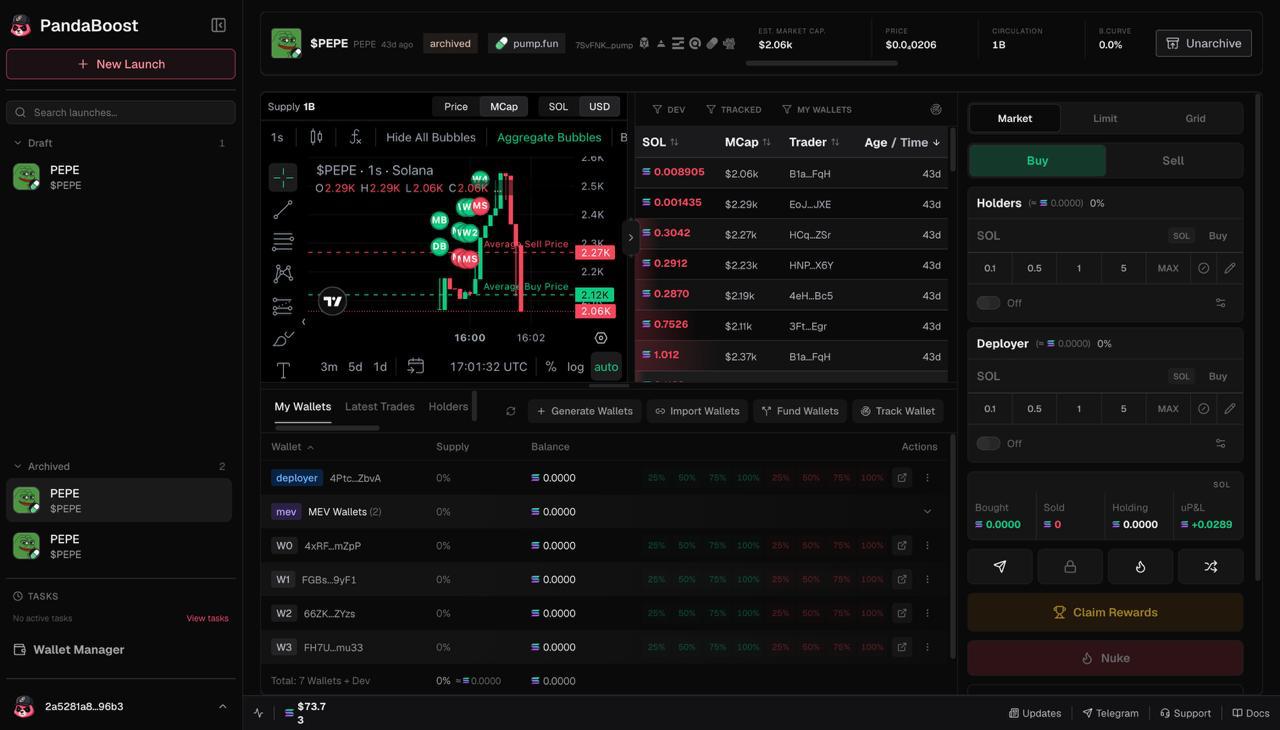
Panda Bundler is a web launch and native trading terminal for teams that want the launch and the first post-launch actions in one operator workspace. It is useful when a developer, project lead, and trading operator need to work from the same launch state instead of passing wallet lists, screenshots, and status updates between separate tools.
| Stage | What Panda Bundler keeps together |
|---|---|
| Wallet preparation | Wallet roles, funding checks, and warmup before launch. |
| Launch execution | Bundled launch setup and execution status in the web platform. |
| Live monitoring | Launch state and chart context without switching workspaces. |
| Post-launch trading | Manual and automated controls for supported trading workflows. |
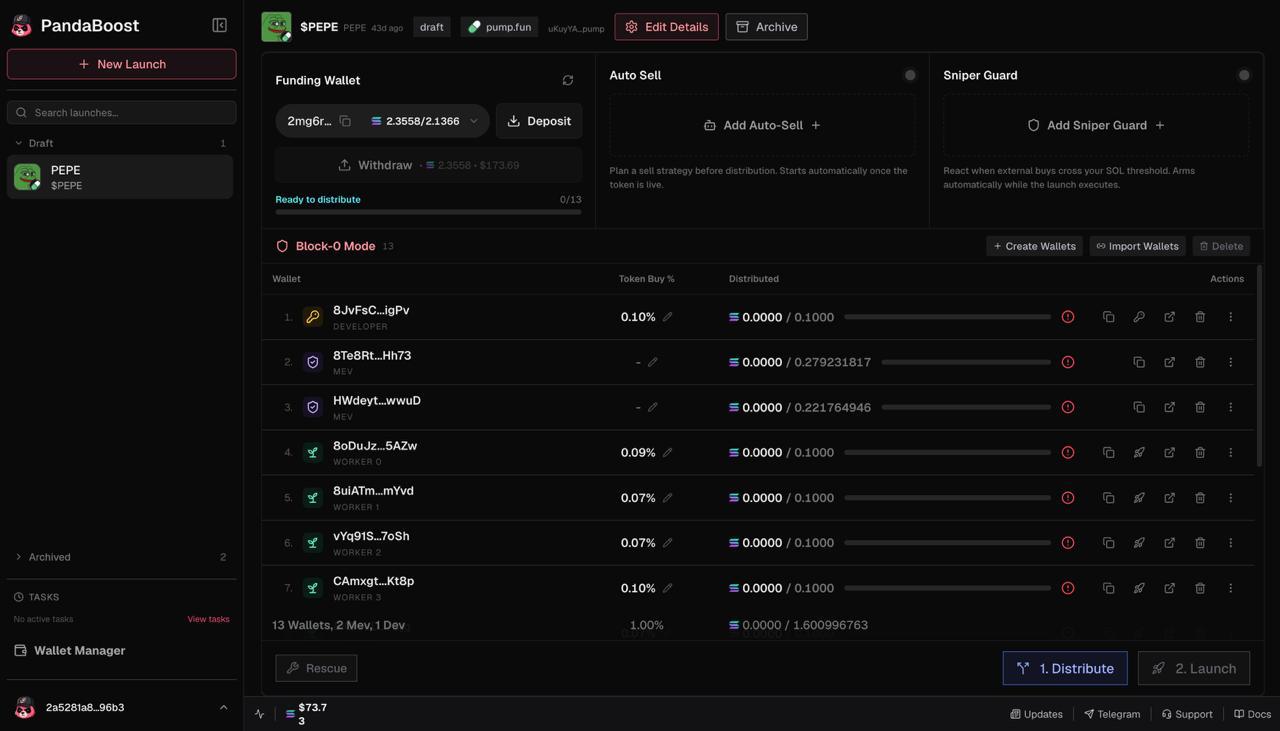
Why this matters for a team: fewer handoffs mean fewer opportunities to use an outdated address, wrong wallet role, stale amount, or mismatched launch plan. The workspace does not replace review or on-chain verification, but it gives the operator a clearer place to prepare, execute, monitor, and respond.
Transparent Panda Bundler fees:
| Fee type | Panda Bundler fee |
|---|---|
| Subscription | $0 |
| Buying or per-trade fee | $0 |
| Selling | 5% |
Solana network fees, Pump.fun fees, bundle tips, and other third-party charges remain separate. Confirm the current quote and supported workflow before using production funds.
Access is web-only. An approved operator receives a PandaBoost support or invite key and enters it on the dedicated Panda Bundler platform. There is no Telegram bot or Wallet Connect sign-in.
Post-launch automation should still have limits. Define which wallets it may use, which actions can run automatically, the maximum amount or exposure allowed by the operator, and how automation is paused. Keep a manual control path available.
Preparing a Pump.fun launch? Open Panda Bundler and request a support key for your team.
Launch and Trade in One Workspace
Prepare wallets, coordinate a bundled Pump.fun launch, monitor the chart, and manage post-launch trading in Panda Bundler.
FAQ
Panda Bundler is built for token teams, developers, technical launch operators, and agencies that want wallet preparation, launch execution, monitoring, and post-launch controls in one web workspace.
The current scope includes wallet preparation and warmup, launch bundling, chart monitoring, and manual or automated post-launch trading for supported workflows.
Finalize immutable token metadata, verify every wallet role and address, separate trade amounts from network and platform costs, confirm the supported venue, and test the complete workflow with a small controlled amount where practical.
Panda Bundler is accessed through its web platform with a support or invite key. There is no subscription or buy/per-trade fee. The only Panda Bundler fee is 5% when selling; network, Pump.fun, tip, and other third-party costs remain separate.

Whatever stage you're at — we're the stack.
Pre-launch? Bundle safe, warm wallets, fund quiet.
Post-launch? Trend on every scanner, chart and feed that matters.
The launch window is short. Don't waste it.